January '26 Increment Release notes
System Wide
✨ Update emails with personalized URL
@mislav.sirac
We’ve updated all email communications to reflect their new URL, ensuring consistent branding and proper routing of all system-generated emails to their users.
What Changed:
-
All email templates now use the new URL
-
Ensures seamless transition for users accessing the platform
-
Maintains consistent user experience across all communication channels
✨ Expand custom message field
@martina.bosnjak
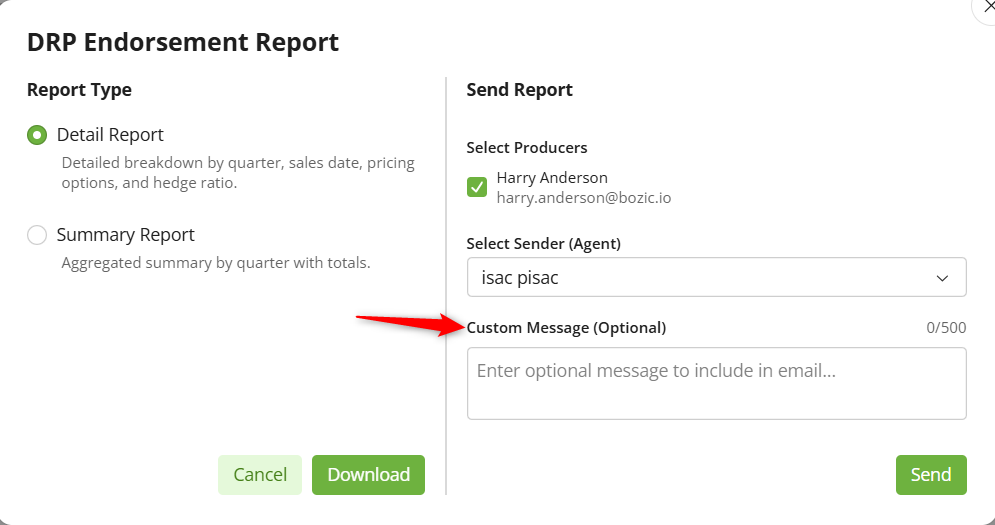
We’ve enhanced the custom message input when sending PDF reports by replacing the single-line text field with a multi-line text box. This improvement allows agents to compose longer, more detailed messages to producers without being constrained by limited visibility.
What’s New:
-
Multi-line Text Box: Expanded input area for composing longer messages
-
Character Counter: Visual indicator showing remaining characters (e.g., "450/500")
-
Vertical Expansion: Text box automatically adjusts to accommodate message length
-
Clear Validation: Users receive clear feedback when exceeding character limits
-
Universal Application: Enhancement applies to both DRP and LRP "Send PDF reports on demand" feature
-
Professional Communication: Agents can now craft more comprehensive messages to producers
This feature is available to all users except those with the producer role, enabling agents to provide more context and personalized communication when distributing reports.
🐛 Fixed Agent AIP sync unlinks after sync
@mislav.sirac
We’ve resolved an issue where agents were becoming unlinked after the AIP sync process. The system now properly maintains agent linkage relationships during synchronization, ensuring data integrity across insurance agent records.
DRP
✨ Display unit in column label
@luka.trdina
We’ve streamlined the presentation of CWT measurements by moving the unit display from individual rows to the column labels. This enhancement reduces visual clutter and improves readability across DRP tables.
What Changed:
-
CWT measure now appears in column headers instead of in each row
-
Cleaner, more compact table presentation
-
Improved readability for summary and detail tables
-
Change applies to all DRP insurance plan views for all users
LRP
✨ Enable different offer display for reports
@nela.martincic
We’ve added flexible pricing display options to the LRP Price Report, allowing users to view pricing information at either the agency level or operation level, with multiple unit formats to suit different reporting needs.
What’s New:
-
Level Selection: Choose between Agency level (all operations that are managed by LIA Global Admins) or Operation level (specific operation from Premium Quoter preferences)
-
Multiple Display Formats:
-
$/CWT (default)
-
$/HEAD
-
$/CWT & $/HEAD (both displayed simultaneously)
-
-
Persistent Settings: Selection remains consistent throughout the reporting session
-
Dynamic Updates: Report automatically refreshes based on chosen level and display format
-
Inheritance Model: Operations inherit agency-level defaults when not specifically configured
-
Helpful Context: Info button displays: "The selected option indicates the value that will be sent in the daily price report"
This enhancement provides agents with maximum flexibility in how they view and present pricing information, accommodating different analysis and communication needs.
✨ Preserve Manual Entries When Updating Parameters
@luka.trdina
We’ve improved the LRP Premium Quoter and coverage request modal to retain manually entered values for head count and target weight when other parameters are modified, eliminating the frustration of having to re-enter these values.
What’s New:
-
Smart Value Retention: Head count field keeps user’s manual entry even when other parameters change
-
Intelligent Weight Handling: Target weight persists as long as it’s valid for the selected commodity type
-
Automatic Correction: System adjusts weight to valid range only when switching to a commodity where the current value is out of bounds
-
Default Population: Fields auto-populate with Premium Quoter preferences on initial load
-
Consistent Behavior: Logic applies to both Premium Quoter page and Coverage Request modal
This enhancement significantly improves the user experience by reducing repetitive data entry and respecting user input throughout the workflow.
✨ Enable Market Gain Visibility for Feeder Cattle and Swine
@luka.trdina, @filip.cogelja
We’ve expanded market gain visibility features to Feeder Cattle and Swine commodities, providing agents with comprehensive information to explain the value of LRP coverage even when endorsements don’t result in indemnity.
What’s New:
Summary Table Enhancements:
-
Change in Actual Price Column: Shows price variance with intelligent calculation based on measure
Endorsement Details Info Modal:
-
Futures Prices
-
5 State Area Price
-
Implied Basis
-
3-Year Basis Analysis
This enhancement helps agents demonstrate the market protection value of LRP endorsements and provides data-driven context for coverage decisions.
✨ Replace labels on LRP info modal
@martina.bosnjak
We’ve updated labels in the LRP info modal to accurately reflect the actual data being displayed, eliminating potential confusion for different commodity types.
What Changed:
Feeder Cattle:
-
"5 State Area Steer Price" → "CME Feeder Cattle Index"
-
"AMS 5 State Steer Cash Price" → "CME Feeder Cattle Index"
Swine:
-
"5 State Area Steer Price" → "CME Lean Hog Index"
-
"AMS 5 State Steer Cash Price" → "CME Lean Hog Index"
Note: Fed Cattle labels remain unchanged as they are already accurate.
✨ Total Values on Endorsement summary
@martina.bosnjak
We’ve added automatic totals to the LRP Endorsement summary table when viewing data in total amount, allowing users to quickly see aggregate values across all displayed endorsements.
What’s New:
-
Automatic Totals: Displayed when the measure is switched to "$" for:
-
Number of Head
-
Producer Premium
-
Forecasted Indemnity
-
Change in Actual Price
-
-
Clear Labeling: Totals row labeled as "Totals" in bold font
-
Dynamic Calculation: Automatically sums all displayed values in the current summary view
This feature provides quick insight into overall coverage and financial positions without requiring manual calculations.
✨ Sort Price Report Preferences
@martina.bosnjak
We’ve added alphabetical sorting capability to the LRP price report preferences, making it easier to locate and organize commodities and types in the preference list.
What’s New:
-
A-Z Sorting: Available for both Commodity and Type columns
-
Logical Organization: Simplifies viewing and managing preference lists
-
Improved Navigation: Quickly find specific commodities in longer lists
🐛 Active Endorsement tab not selected by default
@martina.bosnjak
We’ve corrected the default tab selection when switching from DRP to LRP within the same operation. The Active Endorsements tab is now properly selected by default, ensuring a consistent and intuitive navigation experience.
🐛 Wrong month order on the chart (PDF report)
@mislav.sirac
We’ve corrected the month ordering on charts in PDF reports to match the web application display. Charts now show months in the proper chronological sequence, providing accurate visual representation of data trends. This fix applies to both DRP and LRP PDF reports across all available options.
LGM
🐛 Unable to add Cattle endorsement
@mislav.sirac
We’ve fixed an issue where users were unable to add LGM Cattle endorsements due to incorrect sales date validation. The system was incorrectly applying Dairy sales suspension to all LGM commodity types, preventing valid Cattle endorsement creation.
What’s Fixed:
-
Price availability is now properly checked by commodity code
-
Cattle endorsements can be added when Cattle sales are open, even if Dairy sales are suspended
-
Each LGM commodity type (Cattle, Dairy, Swine) now has independent sales date validation
🐛 Estimated actual price shows wrong values
@mislav.sirac
We’ve corrected the calculation of estimated actual prices for LGM Cattle endorsements. The system now displays accurate price forecasts, ensuring reliable margin calculations and indemnity projections.
LIA Mobile app for iOS
We’ve implemented several updates for the iOS mobile app to enhance the user experience and functionality.
✨ Available Sales Dates on Homepage for DRP
@maja.pilipovic
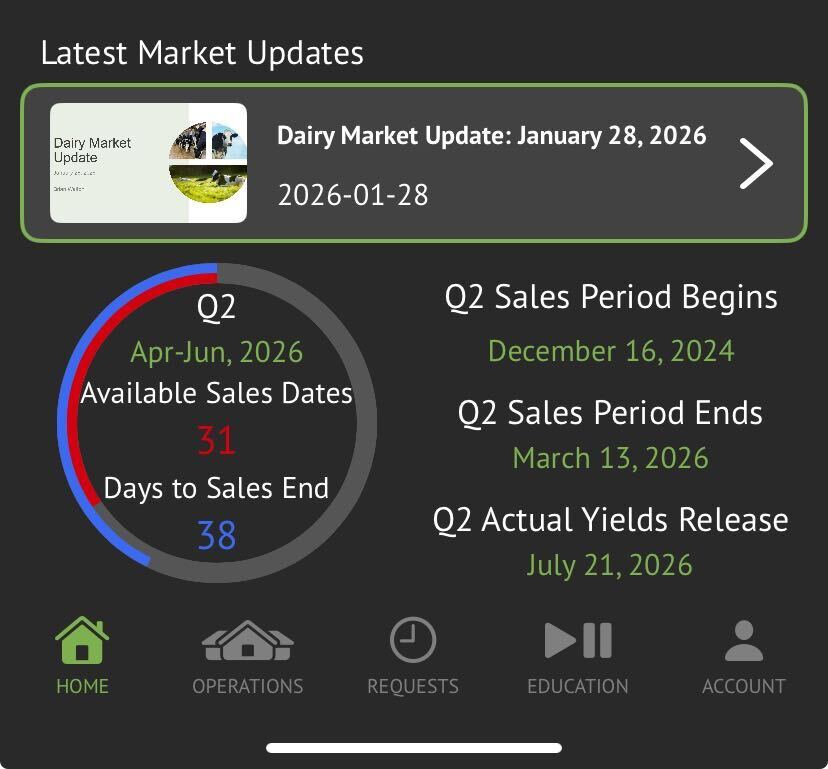
We’ve enhanced the DRP homepage to provide more comprehensive information about purchasing opportunities. The display now shows both the total days remaining until sales end and the number of actual sales dates available within that timeframe.
What’s New:
-
Dual Information Display: Circle now contains:
-
Available Sales Dates: Count of all calendar dates where sales are not suspended from today to Sales End Date
-
Days to Sales End Date: Total days remaining until the sales period closes
-
-
Better Planning: Users can distinguish between calendar days remaining and actual trading opportunities
-
Informed Decisions: Clear visibility into purchasing window helps with timing strategies
This enhancement provides users with more actionable information for planning their DRP coverage purchases.
✨ Sharing from DRP premium quoter
@damir.stojanov
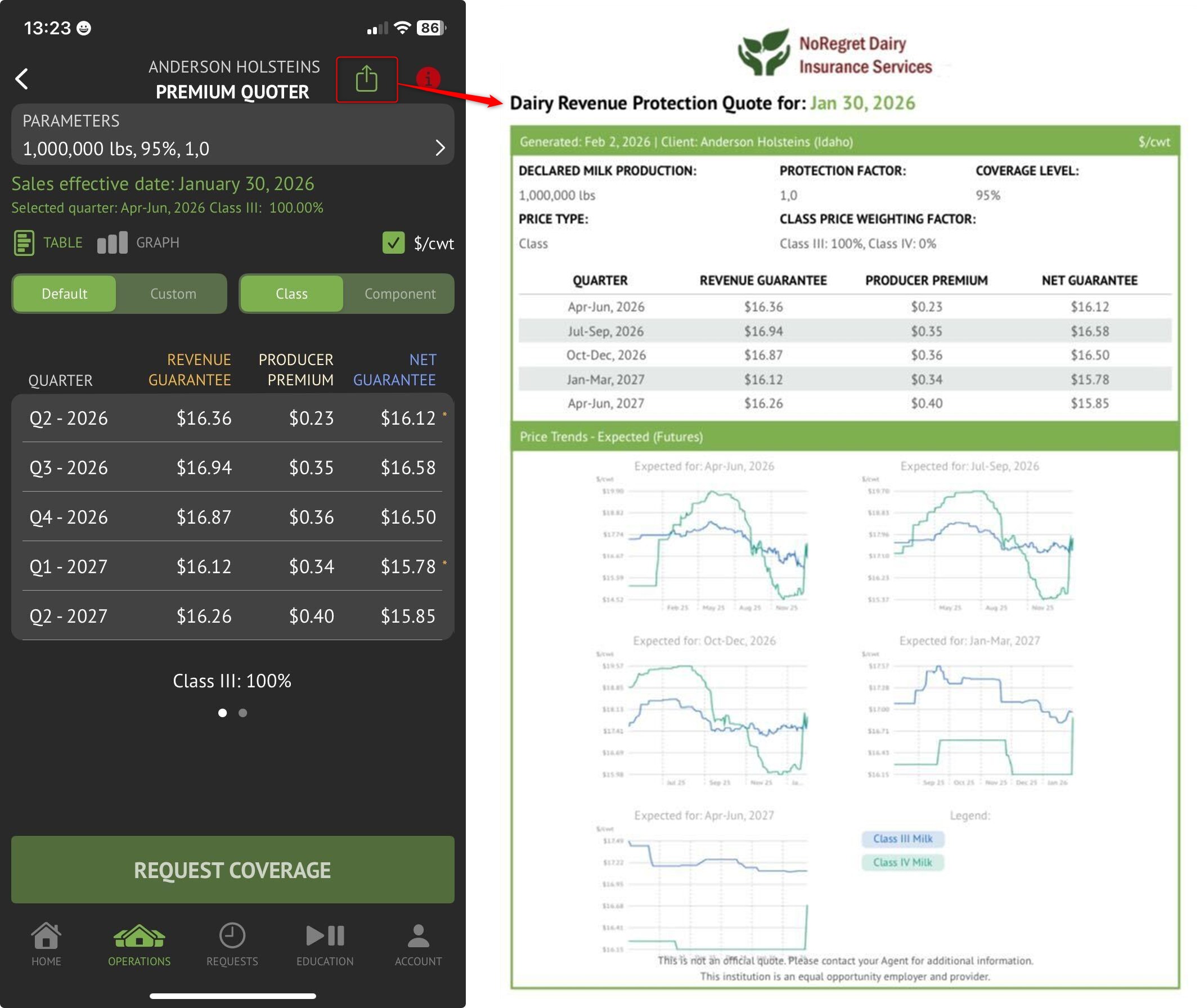
We’ve added the ability for users to share specific insurance offers directly from the DRP premium quote page in the iOS mobile app, enabling easy distribution of quote information through preferred communication channels.
What’s New:
-
Native Share Button
-
iOS Share Sheet: Access all standard sharing options (email, message, AirDrop, copy link, etc.)
-
Complete Offer Details: Shared content includes Price Trends Future charts for all available quarters
-
Professional Formatting: Content is formatted for clear, professional presentation to recipients
-
No Login Required: Recipients can view offer details without app access
This feature streamlines communication with producers and enables quick, professional sharing of pricing information.
🐛 Fix edgecase stale head count value on LRP Quoter
@patrick.ruzman
We’ve resolved an edge case where the head count value on the LRP Quoter could become stale when the app was backgrounded and then returned to foreground. The issue occurred when preference refetching triggered parameter resets, but the quoter display wasn’t properly synchronized.
What’s Fixed:
-
Quoter input for head count now properly updates to match parameter status
-
Prevents stale values from persisting after app background/foreground transitions
-
Refetching preferences no longer triggers unwanted parameter updates when app returns from background
-
Head count, commodity type, and target weight values remain synchronized